IT services
Wifi solutionsOffice cybersecurityWorkplace cyber defenseMicrosoft 365Workplace managementCloud backupServer as a serviceServer hostingVirtual serverNIS2 DirectiveIT infrastructure managementSpecialist as a serviceConsultation and migrationCybersecurity solutionsNetwork solutionsServersData arraysBackupVirtualizationHardware warranty and maintenanceIT service partners
Manage your services and devices
E-shop
Elisa e-shopElisa recommendsiPhone 18 seriesSamsung S26 seriesNew productsSmartphonesLandline phonesMobile phone accessoriesRouters, WiFi devicesTabletsComputersMonitors, docksAccessoriesTelevisions and projectorsSoundbar and home theaterFor gamersAdventure camerasTV mountsAccessoriesSmartwatches and devicesHeadphones and speakersSmart officeBeauty and HealthPrepaid card productsUsed devices
Internet
Smart packagesStandalone 5GOn the computer and tabletAdditional internet dataElisa IoTStatic IPInternet, calls and messages while abroadFixed internetFixed internet service level (SLA)Mobiilne internet
Manage your services and devices
Calls
Internet, calls and messages while abroadCalling foreign numbers from EstoniaJoin ElisaElisa RingSpeech service numberMobile office phoneIP CentrexCalling foreign numbers from Estonia
Manage your services and devices
Additional services
Mobile-IDMultiSIMConvenience services and call managementElisa Net GuardSmart insuranceGroup SMSOperating leaseElisa Stage production services
Manage your services and devices
Support Center
Self-service
Self-Service HomepageServices and DevicesOrder HistoryService Users and AuthorizationsInvoices and Payment HistoryCurrent Month UsageStatement of services usedBilling and Notification ChannelsAlerts
The first action for every user in Elisa self-service is logging in.
The login window opens when you click the button
"Enter self-service"
. The client can log in using the following secure methods:
With Mobile-ID
With ID card
With Smart-ID
Via bank
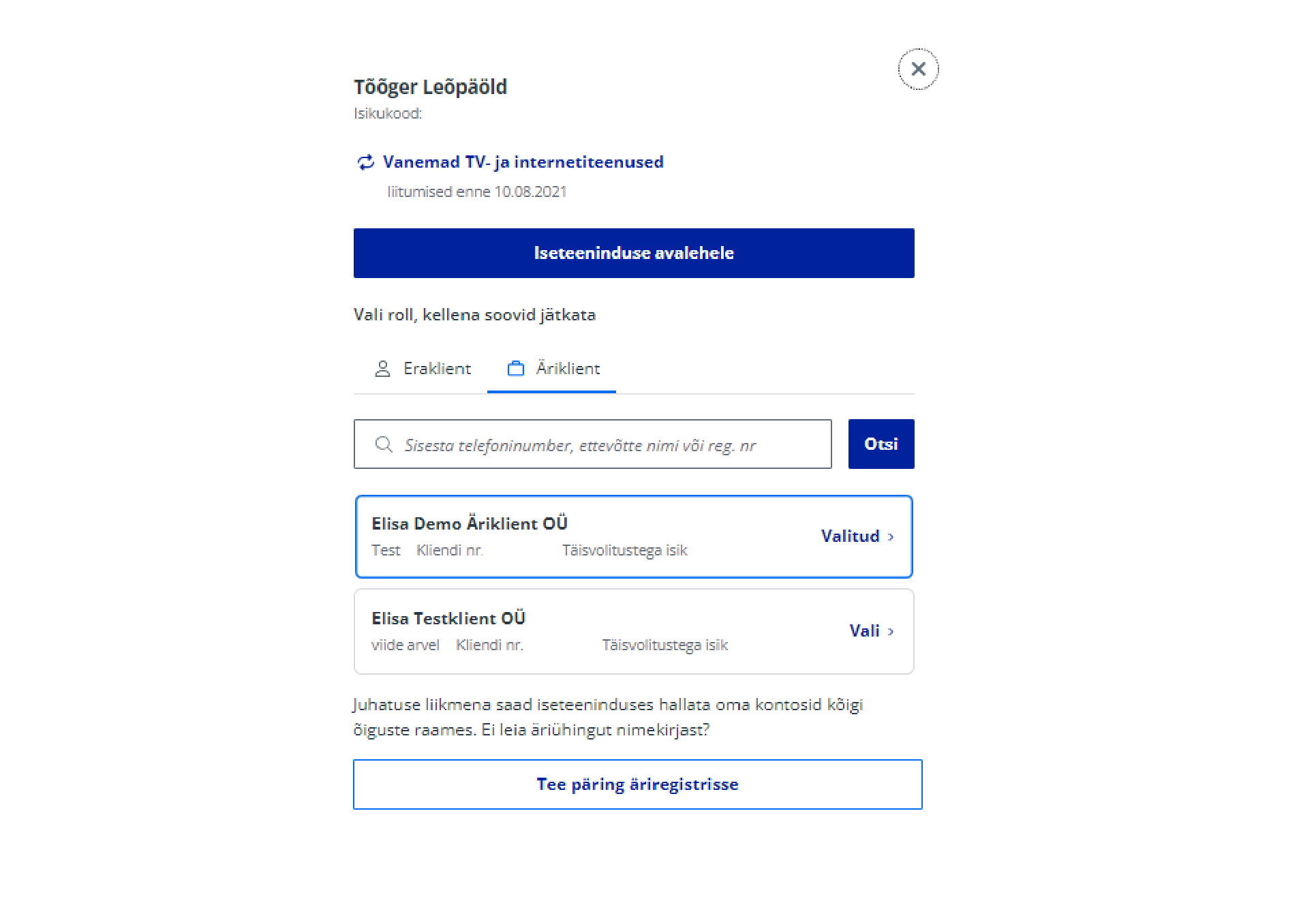
Client number selection
After logging in, you will reach the client number selection page.
If you logged in from the Business Client view on the homepage, you will automatically be shown Business Client options. Otherwise, after logging in, click on the menu item "Business Client".
You can find the correct client number by entering the mobile number you are interested in into the search.
The user is shown all client numbers they are associated with. The user is automatically linked to a client number if the client logs in as a board member. In the user view, users can also be added manually. Users can also be linked to a number under the client number.
If a company board member has successfully logged in, but the company's client number is missing from the options, or the option exists but the board member's role is not correct, they can always make a new query to the business register by clicking the button "Make a query to the business register". This situation may occur for clients logging into self-service for the first time and the algorithm has not yet been able to identify them as a board member for some reason.
The board member is automatically linked to all companies they represent.
Only a user with board member rights can grant rights to other users. A user with full authorization does not have this right.
Back
Contacts and StoresElisa FIXDevice GuidesPrivate Customer Help CenterBusiness Customer Help CenterAbout ElisaCareersService Terms and Price ListsSustainabilityFor Builders and DevelopersFor CarriersPress InformationData ProtectionLanguage VersionsCookie SettingsAccessibility
All rights reserved 2026
Elisa Eesti AS