I don't see the discount promised to me on my invoice. Why?
If you have been given a discount that applies to a specific mobile number (e.g., a discount on SIM card replacement or connection fee), you will find it on the second page of the invoice, under the section for that specific mobile number.
If you have been given a discount that applies to your entire family package – for example, a discount on the family package monthly fee or a discount on the total invoice amount – you will find it on the front page of the invoice in the “customer-specific charges” section.
If the connection discount you were given was previously on your invoice but is no longer there, the reason may be that the campaign discount has ended.
I have a charge for internet on my invoice. What is this?
If your invoice includes the entry “M-internet (internet)”, you have used mobile internet on your smart device with a service (call package) that is actually intended only for calls and sending messages. NB! For unexpected needs (such as searching for information), the call package has an open internet service at a price of 2.28 euros per megabyte. If you want to continue using mobile internet on your smart device at a better price, activate an additional mobile , Avaneb uues vahekaardisinternet add-on service. If you want to restrict internet usage on your mobile number to avoid similar expenses in the future, you have 2 options:
Activate a mobile internet restriction (MiNT restriction) on your mobile number. You can do this in Elisa Self-Service. , Avaneb uues vahekaardis"I want my number not to be able to use the internet. What should I do?"
Turn off the option to use mobile internet on your device.
How much do services cost in my call or smart package?
You can see information about your currently valid service package in Elisa Self-Service.
1.
Log in to Elisa Self-Service
2.
If you have access to different customer numbers, choose which customer number's information you want to view.
3.
From the main menu, select “Services and devices”
4.
Select the mobile number
Why are there international calls on my invoice, even though I didn't travel abroad last month?
Services used abroad often appear on the invoice with a delay, as it takes time to receive information from the foreign operator. Therefore, calls made abroad in the previous month may be reflected on the invoice (e.g., calls made abroad in March may appear on the April invoice). However, on the call breakdown (which can be viewed in the self-service office), these calls are in the correct month, and you can check the time the call was made/service was used there (e.g., calls made abroad and services used in March may appear on the April invoice, but not on the April call breakdown).
There is a charge for MMS on my invoice. Why?
MMS appears on your invoice if you have sent messages containing a video or picture. Sending an MMS is charged according to the size/volume of the MMS sent. Up to 100 kB costs 0.32 euros; each additional 100 kB costs 0.32 euros. NB! Long messages may turn into MMS. Depending on the device, smartphones may convert a long message into a multimedia message (MMS). Usually, the phone notifies you of this, and instead of the character count, it displays either the message size (e.g., 1 kB) or an MMS indicator in the message sending window. In addition to long text, the length of the message can also be increased by the letter õ or other special characters and emoticons. Emoticons in SMS text can automatically turn an SMS into a multimedia message (MMS). Large images If you know you have sent a picture message but are surprised by its cost, check how large the images your phone creates are. NB! For example, iPhone does not automatically convert images sent via MMS to a smaller size as Android does. To avoid sending large images, iOS 10 users on iPhone can activate the “low-quality image mode” option in settings: Settings->Messages->activate low-quality image mode. iMessage function on iPhone An MMS may also appear on your invoice if you have the iMessage function enabled on your iPhone. If the recipient does not use the iMessage service or is offline for too long, iMessage messages on the phone may be converted into paid MMS messages, regardless of your service provider. To avoid this, you have two options:
Turn off the automatic conversion to message option: Settings->Messages->Send as SMS.
Turn off MMS messages completely: Settings->Messages->under the MMS Messaging menu item. When you start writing a message, you can see on the text input line what type of message will be sent. Additionally, you can see by the color of the sent text “bubble” whether it is an iMessage (blue) or SMS/MMS (green) message.
Why is the number of sent SMS on my invoice higher than I actually sent?
This means you have sent SMS messages that consisted of several SMS (the character count is more than 160). The length of one SMS is 160 characters. Exceptionally, one SMS can be 70 characters long if you used the Cyrillic alphabet, the letter õ, or emoticons. Concatenated message formation: A concatenated message consists of one to three messages, where the character count is 160+145+152 if written in Cyrillic, or if it contains the letter õ or emoticons, then 70+63+66 characters. Usually, phones also show information about how many SMS the composed text consists of. SMS turning into MMS: Starting from the fourth message, smartphones convert the message into a multimedia message (MMS) – in this case, the phone notifies the user, and instead of the character count, the message size is displayed (e.g., 1 kB).
Why is there a - Restriction removal fee on my invoice?
If your number is restricted due to debt and is reopened after the invoice is paid, a “Restriction removal fee” of €7.12 will be added to the next invoice.
I paid off the remaining installments for my phone, why is this amount shown again on my invoice?
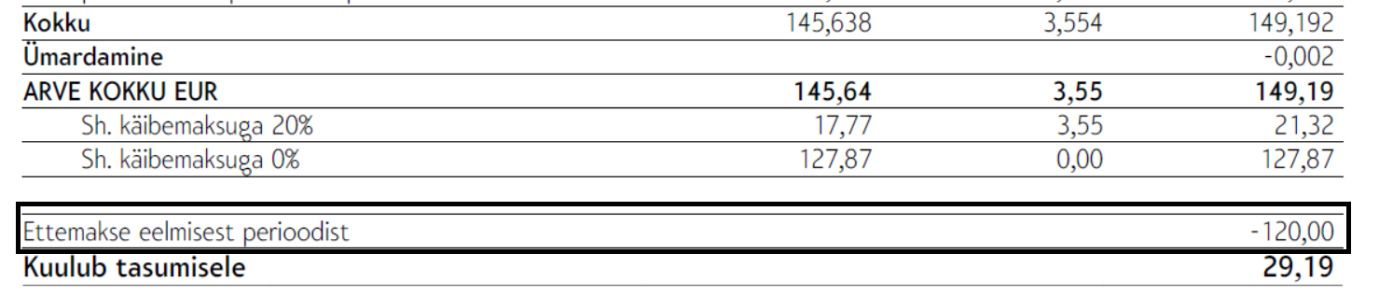
Since installments are part of the Elisa invoice and Elisa invoices are issued once a month, the paid balance is considered a prepayment until the next billing period. Therefore, the invoice shows both the balance amount as a positive and the already paid part as a negative, i.e., as a prepayment. This means that your Elisa mobile invoice does show the balance of the installments, but you do not have to pay it again, of course. For payment, use the amount shown on the line “Amount due”. This amount indicates that you have paid the balance of the installments. On the invoice breakdown, the balance amount is shown as follows: And on the front page of the invoice, the prepayment in the same amount is visible:
What does the line - M-Commerce or Games and entertainment mean on my invoice?
M-Commerce means you have purchased, for example, a movie ticket, bus ticket, lottery ticket, paid for parking, or bought an app from the Google Play store with your mobile. Games and entertainment means you have used your mobile to access games, participate in lotteries, vote, etc., via premium-rate service numbers. , Avaneb uues vahekaardisYou can find the price list for premium-rate voice service numbers here, Avaneb uues vahekaardisPrice list for premium-rate SMS short numbers here
My invoice shows a debt, even though I have paid it. Why?
Invoices are prepared as of the 1st of the month. If you paid the invoice, for example, on the 3rd, it will not be reflected on your invoice.
Why is there a handling fee on my invoice?
A handling fee is added to the invoice if, during a fixed-term contract, you have:
Terminated a contract that has an active installment or discounted device sales agreement, or Elisa has terminated it due to unpaid invoices
Switched to a call or smart package with a lower monthly fee
Switched a mobile internet add-on service to one with a lower monthly fee
Closed a mobile internet add-on service A fixed-term contract is usually concluded for 24 months when selling property with installments or at a discounted price. See your contract or Elisa Self-Service for more detailed terms.
Why is there a debt management fee on my invoice?
A debt management fee is added to the invoice if the invoice is not paid by the due date and payment is delayed even after a debt notification is sent on the monthly invoice and by SMS. The debt management fee is added when a warning letter is sent to the customer.
Why is there interest on my invoice?
If the invoice is not paid by the due date, interest of 0.065% is calculated for each day.
Новый Elisa Elamus и Huub
Смотреть
Более старые TV-услуги Подключения до 10.08.2021
Смотреть
Более старую ТВ-услугу можно смотреть в интернете до 31.05.2024. Если Вы хотите продолжать смотреть ТВ в интернете, присоединяйтесь к Elisa Elamus!
Back
Contacts and StoresElisa FIXDevice GuidesPrivate Customer Help CenterBusiness Customer Help CenterAbout ElisaCareersService Terms and Price ListsSustainabilityFor Builders and DevelopersFor CarriersPress Information, Avaneb uues vahekaardis, Avaneb uues vahekaardis, Avaneb uues vahekaardis, Avaneb uues vahekaardisData ProtectionLanguage VersionsCookie SettingsAccessibility All rights reserved 2026 Elisa Eesti AS